<!DOCTYPE html>
    <html lang="vi" xmlns="http://www.w3.org/1999/xhtml" prefix="og: http://ogp.me/ns#">
    <head>
<title>Hướng dẫn thay đổi giá trị Port trên router</title>
<meta name="description" content="Hướng dẫn thay đổi giá trị Port trên router - Savefile - Tin tức - http&#x3A;&#x002F;&#x002F;www.tm-pccc.com&#x002F;savefile&#x002F;Tai-lieu-ky-thuat&#x002F;Huong-dan-thay-doi-gia-tri-Port-tren-router-119.html">
<meta name="author" content="PCCC Thiên Đăng">
<meta name="copyright" content="PCCC Thiên Đăng [mail@thiendang.net]">
<meta name="generator" content="NukeViet v4.5">
<meta http-equiv="Content-Type" content="text/html; charset=utf-8">
<link rel="shortcut icon" href="http://tm-pccc.com/uploads/favicon.ico">
<link rel="canonical" href="http://www.tm-pccc.com/savefile/Tai-lieu-ky-thuat/Huong-dan-thay-doi-gia-tri-Port-tren-router-119.html">
<link rel="alternate" href="http://tm-pccc.com/rss/" title="Tin tức" type="application/rss+xml">
<link rel="alternate" href="http://tm-pccc.com/rss/Du-an/" title="Tin tức - Dự án" type="application/rss+xml">
<link rel="alternate" href="http://tm-pccc.com/rss/Thong-tin-san-pham/" title="Tin tức - Thông tin sản phẩm" type="application/rss+xml">
<link rel="alternate" href="http://tm-pccc.com/rss/He-thong-Sprinkler/" title="Tin tức - Hệ thống Sprinkler" type="application/rss+xml">
<link rel="alternate" href="http://tm-pccc.com/rss/Ba-o-cha-y-tu-do-ng/" title="Tin tức - Báo cháy tự động" type="application/rss+xml">
<link rel="alternate" href="http://tm-pccc.com/rss/linh-vuc-hoat-dong/" title="Tin tức - Lĩnh vực hoạt động" type="application/rss+xml">
<link rel="alternate" href="http://tm-pccc.com/rss/Catalog-san-pham-14/" title="Tin tức - Catalog sản phẩm" type="application/rss+xml">
<link rel="alternate" href="http://tm-pccc.com/rss/Thiet-bi-bao-chay-Hochiki/" title="Tin tức - Thiết bị báo cháy Hochiki" type="application/rss+xml">
<link rel="alternate" href="http://tm-pccc.com/rss/Thiet-bi-bao-chay-Nohmi/" title="Tin tức - Thiết bị báo cháy Nohmi" type="application/rss+xml">
<link rel="alternate" href="http://tm-pccc.com/rss/Thiet-bi-bao-chay-GST/" title="Tin tức - Thiết bị báo cháy GST" type="application/rss+xml">
<link rel="alternate" href="http://tm-pccc.com/rss/Camera-quan-sat-EverFocus/" title="Tin tức - Camera EverFocus" type="application/rss+xml">
<link rel="alternate" href="http://tm-pccc.com/rss/Thoat-hiem-ISHIKAWA/" title="Tin tức - Thoát hiểm ISHIKAWA" type="application/rss+xml">
<link rel="alternate" href="http://tm-pccc.com/rss/Thiet-bi-Tyco/" title="Tin tức - Thiết bị Tyco" type="application/rss+xml">
<link rel="alternate" href="http://tm-pccc.com/rss/Doorphone-Komco-Commax/" title="Tin tức - Doorphone Komco - Commax" type="application/rss+xml">
<link rel="alternate" href="http://tm-pccc.com/rss/Access-Control-Palco/" title="Tin tức - Access Control Palco" type="application/rss+xml">
<link rel="alternate" href="http://tm-pccc.com/rss/Dau-phun-Sprinkler/" title="Tin tức - Đầu phun Sprinkler" type="application/rss+xml">
<link rel="alternate" href="http://tm-pccc.com/rss/Alarm-check-valve/" title="Tin tức - Alarm check valve" type="application/rss+xml">
<link rel="alternate" href="http://tm-pccc.com/rss/Deluge-Valve/" title="Tin tức - Deluge Valve" type="application/rss+xml">
<link rel="alternate" href="http://tm-pccc.com/rss/Phu-kien-HT-sprinkler/" title="Tin tức - Phụ kiện HT sprinkler" type="application/rss+xml">
<link rel="alternate" href="http://tm-pccc.com/rss/Binh-chua-chay/" title="Tin tức - Bình chữa cháy" type="application/rss+xml">
<link rel="alternate" href="http://tm-pccc.com/rss/Voi-chua-chay/" title="Tin tức - Vòi chữa cháy" type="application/rss+xml">
<link rel="alternate" href="http://tm-pccc.com/rss/Thiet-bi-chua-chay-Foam/" title="Tin tức - Thiết bị chữa cháy Foam" type="application/rss+xml">
<link rel="alternate" href="http://tm-pccc.com/rss/Thiet-bi-chua-chay-khi-nen/" title="Tin tức - Thiết bị chữa cháy khí nén" type="application/rss+xml">
<link rel="alternate" href="http://tm-pccc.com/rss/Bom-dien-chua-chay/" title="Tin tức - Bơm điện chữa cháy" type="application/rss+xml">
<link rel="alternate" href="http://tm-pccc.com/rss/Phu-kien-He-thong-Ong-chua-chay/" title="Tin tức - Phụ kiện Hệ thống Ống chữa cháy" type="application/rss+xml">
<link rel="alternate" href="http://tm-pccc.com/rss/Bom-xang-chua-chay/" title="Tin tức - Bơm xăng chữa cháy" type="application/rss+xml">
<link rel="alternate" href="http://tm-pccc.com/rss/Ong-Dung-cho-HT-PCCC/" title="Tin tức - Ống Dùng cho HT PCCC" type="application/rss+xml">
<link rel="alternate" href="http://tm-pccc.com/rss/Ong-thep-HT-PCCC/" title="Tin tức - Ống thép HT PCCC" type="application/rss+xml">
<link rel="alternate" href="http://tm-pccc.com/rss/Ong-Nhua-HT-PCCC/" title="Tin tức - Ống Nhựa HT PCCC" type="application/rss+xml">
<link rel="alternate" href="http://tm-pccc.com/rss/Tai-lieu-ky-thuat/" title="Tin tức - Tài liệu kỹ thuật" type="application/rss+xml">
<link rel="alternate" href="http://tm-pccc.com/rss/Huong-dan-su-dung/" title="Tin tức - Hướng dẫn sử dụng" type="application/rss+xml">
<link rel="alternate" href="http://tm-pccc.com/rss/qcvn-06-2022/" title="Tin tức - QCVN 06&#x3A;2022" type="application/rss+xml">
<link rel="alternate" href="http://tm-pccc.com/rss/Ban-can-biet/" title="Tin tức - Bạn cần biết" type="application/rss+xml">
<link rel="alternate" href="http://tm-pccc.com/rss/Kien-thuc/" title="Tin tức - Kiến thức" type="application/rss+xml">
<link rel="alternate" href="http://tm-pccc.com/rss/Co-ban/" title="Tin tức - Cơ bản" type="application/rss+xml">
<link rel="alternate" href="http://tm-pccc.com/rss/Thu-thuat/" title="Tin tức - Thủ thuật" type="application/rss+xml">
<link rel="alternate" href="http://tm-pccc.com/rss/Tin-hoc-van-phong/" title="Tin tức - Tin học văn phòng" type="application/rss+xml">
<link rel="alternate" href="http://tm-pccc.com/rss/Thiet-ke-Do-hoa/" title="Tin tức - Thiết kế - Đồ họa" type="application/rss+xml">
<link rel="alternate" href="http://tm-pccc.com/rss/Tin-tuc/" title="Tin tức - Tin  tức" type="application/rss+xml">
<link rel="alternate" href="http://tm-pccc.com/rss/Ban-tin-T-M/" title="Tin tức - Bản tin T-M" type="application/rss+xml">
<link rel="alternate" href="http://tm-pccc.com/rss/Thong-bao/" title="Tin tức - Thông báo" type="application/rss+xml">
<link rel="alternate" href="http://tm-pccc.com/rss/PCCC-Ho-Chi-Minh/" title="Tin tức - PCCC Hồ Chí Minh" type="application/rss+xml">
<link rel="alternate" href="http://tm-pccc.com/rss/Tinh-Hinh-Chay-No/" title="Tin tức - Tình Hình Cháy Nổ" type="application/rss+xml">
<link rel="alternate" href="http://tm-pccc.com/rss/Chan-Dung-Nguoi-Linh-PCCC/" title="Tin tức - Chân Dung Người Lính PCCC" type="application/rss+xml">
<link rel="alternate" href="http://tm-pccc.com/rss/English-Articles/" title="Tin tức - English Articles" type="application/rss+xml">
<link rel="alternate" href="http://tm-pccc.com/rss/phong-trung-bay-san-pham/" title="Tin tức - Phòng trưng bày sản phẩm" type="application/rss+xml">
<link rel="alternate" href="http://tm-pccc.com/rss/thiet-bi-chua-chay/" title="Tin tức - THIẾT BỊ CHỮA CHÁY" type="application/rss+xml">
<link rel="alternate" href="http://tm-pccc.com/rss/he-thong-chua-chay/" title="Tin tức - HỆ THỐNG CHỮA CHÁY" type="application/rss+xml">
<link rel="preload" as="style" href="http://tm-pccc.com/assets/css/font-awesome.min.css" type="text/css">
<link rel="preload" as="style" href="http://tm-pccc.com/themes/default/css/bootstrap.non-responsive.css" type="text/css">
<link rel="preload" as="style" href="http://tm-pccc.com/themes/default/css/style.css" type="text/css">
<link rel="preload" as="style" href="http://tm-pccc.com/themes/default/css/style.non-responsive.css" type="text/css">
<link rel="preload" as="style" href="http://tm-pccc.com/themes/default/css/news.css" type="text/css">
<link rel="preload" as="style" href="http://tm-pccc.com/themes/default/css/custom.css" type="text/css">
<link rel="preload" as="script" href="http://tm-pccc.com/assets/js/jquery/jquery.min.js" type="text/javascript">
<link rel="preload" as="script" href="http://tm-pccc.com/assets/js/language/vi.js" type="text/javascript">
<link rel="preload" as="script" href="http://tm-pccc.com/assets/js/DOMPurify/purify3.js" type="text/javascript">
<link rel="preload" as="script" href="http://tm-pccc.com/assets/js/global.js" type="text/javascript">
<link rel="preload" as="script" href="http://tm-pccc.com/assets/js/site.js" type="text/javascript">
<link rel="preload" as="script" href="http://tm-pccc.com/themes/default/js/news.js" type="text/javascript">
<link rel="preload" as="script" href="http://tm-pccc.com/themes/default/js/main.js" type="text/javascript">
<link rel="preload" as="script" href="http://tm-pccc.com/themes/default/js/custom.js" type="text/javascript">
<link rel="preload" as="script" href="https://www.googletagmanager.com/gtag/js?id=G-XMJCK8JENQ" type="text/javascript">
<link rel="preload" as="script" href="http://tm-pccc.com/themes/default/js/bootstrap.min.js" type="text/javascript">
<link rel="stylesheet" href="http://tm-pccc.com/assets/css/font-awesome.min.css">
<link rel="stylesheet" href="http://tm-pccc.com/themes/default/css/bootstrap.non-responsive.css">
<link rel="stylesheet" href="http://tm-pccc.com/themes/default/css/style.css">
<link rel="stylesheet" href="http://tm-pccc.com/themes/default/css/style.non-responsive.css">
<link rel="StyleSheet" href="http://tm-pccc.com/themes/default/css/news.css">
<link rel="stylesheet" href="http://tm-pccc.com/themes/default/css/custom.css">
<style type="text/css">
	body{background: #fff;}
</style>
<script>(function(i,s,o,g,r,a,m){i['GoogleAnalyticsObject']=r;i[r]=i[r]||function(){
(i[r].q=i[r].q||[]).push(arguments)},i[r].l=1*new Date();a=s.createElement(o),
m=s.getElementsByTagName(o)[0];a.async=1;a.src=g;m.parentNode.insertBefore(a,m)
})(window,document,'script','https://www.google-analytics.com/analytics.js','ga');
ga('create', 'UA-147951223-1', '.tm-pccc.com');
ga('send', 'pageview');
</script>
</head>
    <body>
<div id="print">
	<div id="hd_print">
		<h2 class="pull-left">PCCC Thiên Đăng</h2>
		<p class="pull-right"><a title="PCCC Thiên Đăng" href="http://tm-pccc.com/">http://tm-pccc.com</a></p>
	</div>
	<div class="clear"></div>
	<hr />
	<div id="content">
		<h1>Hướng dẫn thay đổi giá trị Port trên router</h1>
		<ul class="list-inline">
			<li>Thứ bảy - 02/07/2011 22:42</li>
			<li class="hidden-print txtrequired"><em class="fa fa-print">&nbsp;</em><a title="In ra" href="javascript:;" onclick="window.print()">In ra</a></li>
			<li class="hidden-print txtrequired"><em class="fa fa-power-off">&nbsp;</em><a title="Đóng cửa sổ này" href="javascript:;" onclick="window.close()">Đóng cửa sổ này</a></li>
		</ul>
		<div class="clear"></div>
		<div id="hometext">
			Chúng tôi đã tiến hành thực hiện nhiều bài thử nghiệm về quá trình truy cập file dữ liệu từ bên trong và ngoài hệ thống mạng của bạn. Và trong bài viết dưới đây, chúng tôi tiếp tục đề cập đến vấn đề mà nhiều người thường gặp rắc rối khi bắt tay vào thực hiện, đó là forward port trên router.
		</div>
		<div id="bodytext" class="clearfix">
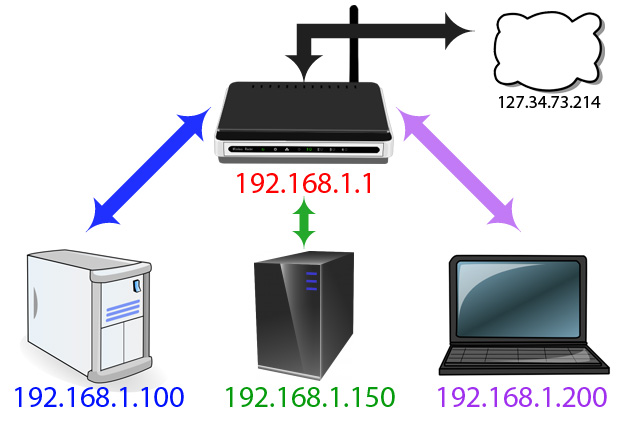
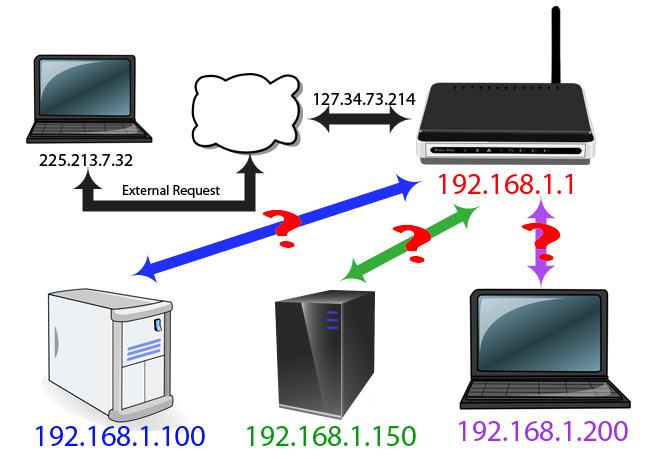
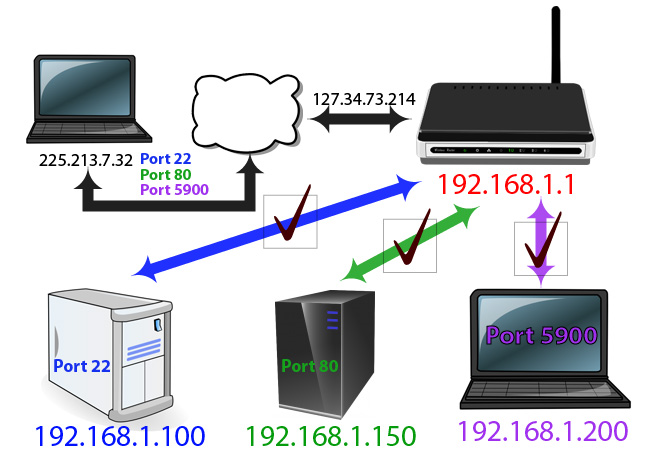
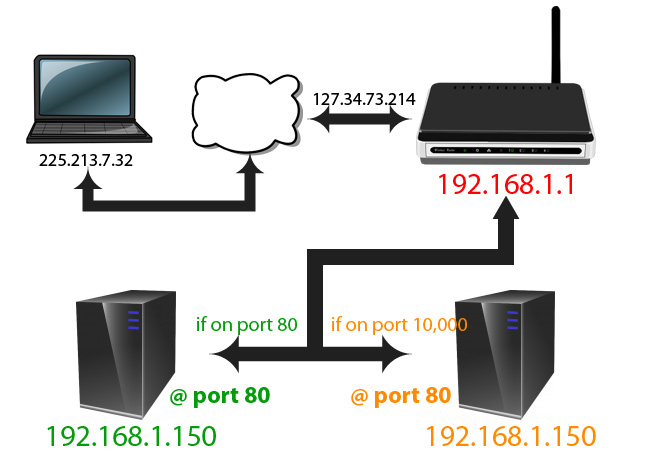
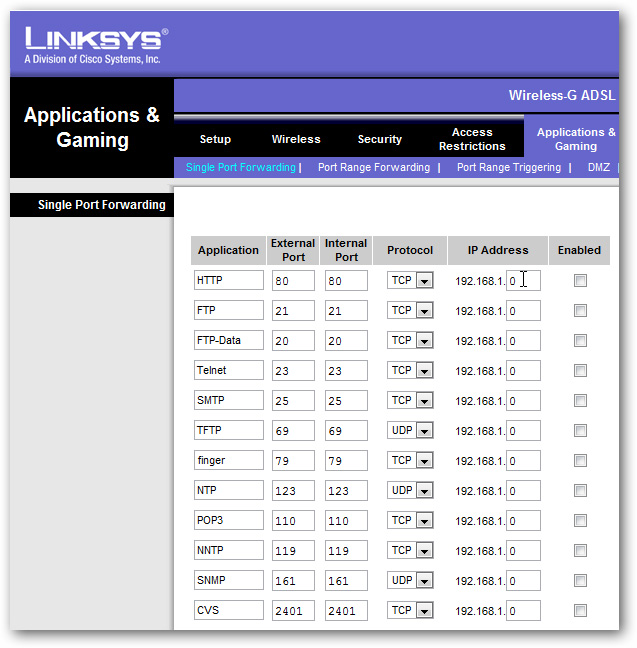
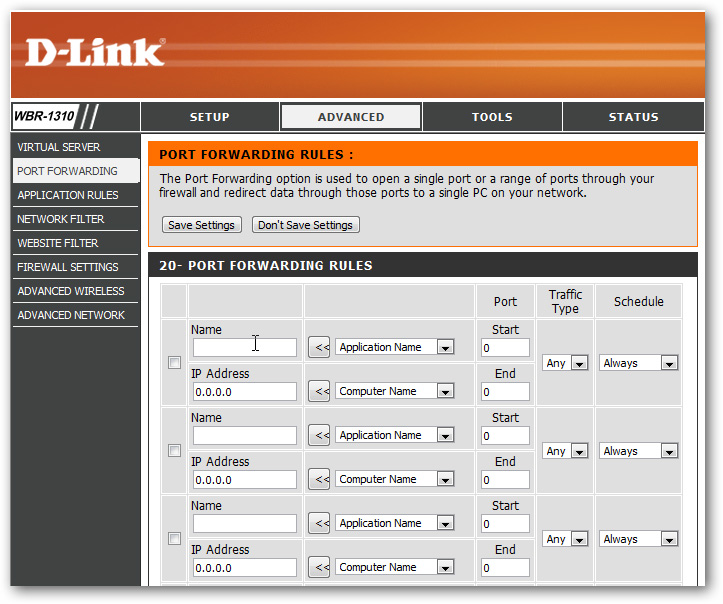
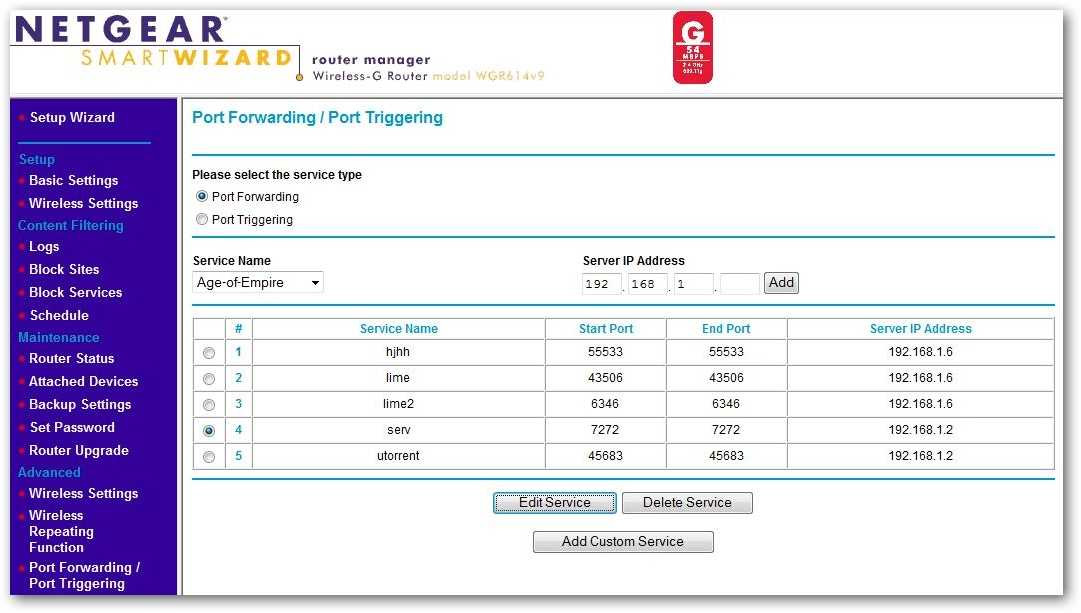
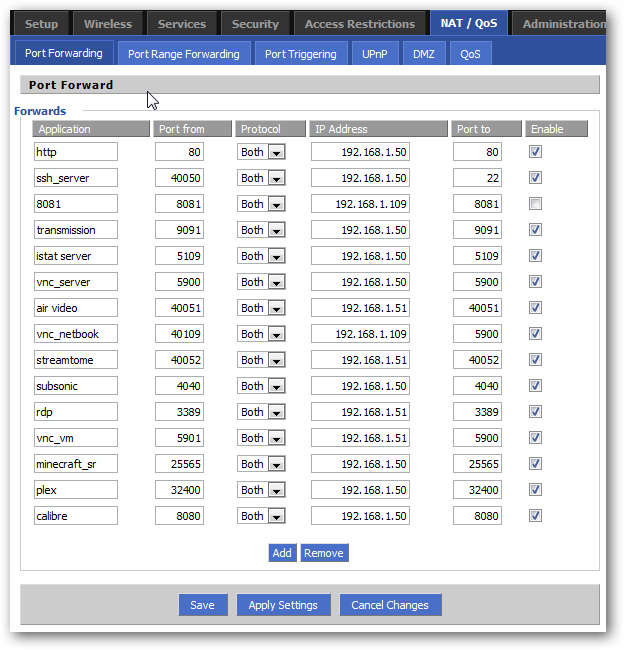
			<h2 style="clear: both; font-size: 13px; margin-top: 15px; line-height: 19px; color: rgb(0, 0, 255);"> Từ trong mô hình mạng của chúng ta:</h2><p style="margin-top: 15px; margin-right: 0px; margin-bottom: 0px; margin-left: 0px; padding-top: 0px; padding-right: 0px; padding-bottom: 0px; padding-left: 0px; line-height: 19px;"> Dưới đây là bản đồ của 1 hệ thống mạng đơn giản:</p><p style="margin-top: 15px; margin-right: 0px; margin-bottom: 0px; margin-left: 0px; padding-top: 0px; padding-right: 0px; padding-bottom: 0px; padding-left: 0px; line-height: 19px; text-align: center;"> <img align="absmiddle" alt="" src="http://www.quantrimang.com.vn/photos/image/062011/22/forwardport--02.jpg" style="width: 490px; height: 335px;" /></p><p style="margin-top: 15px; margin-right: 0px; margin-bottom: 0px; margin-left: 0px; padding-top: 0px; padding-right: 0px; padding-bottom: 0px; padding-left: 0px; line-height: 19px;"> Chúng ta có thể dễ dàng thấy rằng, có 3 máy tính với địa chỉ khác nhau, tất cả đều kết nối tới 1 thiết bị thu phát, qua đó mỗi máy tính đều có thể kết nối với nhau dễ dàng, còn khi truy cập Internet thì tất cả đều phải đi qua router. Về bản chất, thiết bị thu phát này có 1 địa chỉ IP liên quan đến hệ thống mạng của bạn, bên cạnh đó còn có 1 địa chỉ IP khác – được sử dụng để tương tác với những hoạt động khác bên ngoài hệ thống mạng. Cụ thể hơn, mỗi khi máy tính tạo ra 1 yêu cầu để kết nối Internet thì chúng sẽ dùng 1 địa chỉ IP duy nhất, ở đây là 127.34.73.214. Ví dụ, chỉ cần 1 yêu cầu đơn giản như tải dữ liệu từ website, quá trình này được tự động hóa bởi router và các phần dữ liệu được trả về đúng vị trí tương ứng. Về thực chất thì toàn bộ khâu này cũng không quá phức tạp vì mỗi máy tính đều bắt đầu bằng những yêu cầu về dữ liệu duy nhất, và nhiệm vụ của router đã trở nên đơn giản hơn rất nhiều tại bước này.</p><p style="margin-top: 15px; margin-right: 0px; margin-bottom: 0px; margin-left: 0px; padding-top: 0px; padding-right: 0px; padding-bottom: 0px; padding-left: 0px; line-height: 19px;"> <strong style="font-weight: bold;">Tìm hiểu về Port và Protocol:</strong>&nbsp;về cơ bản, port sẽ làm cho quá trình này nhanh và đơn giản hơn. Nếu IP được so sánh với địa chỉ cụ thể của 1 tòa nhà nào đó, thì port tương tự như số tầng và số phòng của mỗi căn hộ. Những port có giá trị thấp tương ứng với các chương trình cố định sẵn, ví dụ khi truy cập vào 1 trang web bất kỳ thì sẽ sử dụng cổng có giá trị 80, những phần mềm trên máy tính nhận được tín hiệu biết rằng cổng 80 đó được dùng để “phục vụ” tín hiệu qua giao thức http, do vậy hệ thống sẽ tiến hành lắng nghe và phản hồi những tín hiệu tương ứng. Trong trường hợp khác, nếu bạn gửi đi 1 tín hiệu http yêu cầu từ 1 cổng khác, ví dụ 143 thì hệ thống web server sẽ không thể nhận dạng những tín hiệu này.</p><p style="margin-top: 15px; margin-right: 0px; margin-bottom: 0px; margin-left: 0px; padding-top: 0px; padding-right: 0px; padding-bottom: 0px; padding-left: 0px; line-height: 19px;"> Bên cạnh đó, các ứng dụng bảo mật thường sử dụng cổng 22, và chương trình VNC lại dùng những cổng có giá trị lớn hơn 5900. Tuy nhiên, các cổng này có thể được thay đổi tùy vào mục đích sử dụng, điển hình là khi bạn có nhiều chương trình hoạt động với nhiều mục đích khác nhau. Để tránh việc xảy ra xung đột giữa các ứng dụng, người sử dụng cần can thiệp vào bên trong để cấu hình. Ví dụ,&nbsp;<a href="http://www.quantrimang.com.vn/thietbiso/thiet-bi-so/thu-thuat-tbs/80048_Chia-se-du-lieu-media-giua-he-dieu-hanh-iOS-va-dien-thoai-Android-voi-Plex.aspx" style="color: rgb(51, 102, 255); text-decoration: none;" target="_blank">Plex Media Server</a>&nbsp;sử dụng cổng 32400, và Minecraft server dùng cổng 25565... Mỗi cổng có thể được sử dụng qua&nbsp;<strong style="font-weight: bold;">TCP - Transmission Control Protocol</strong>, hoặc&nbsp;<strong style="font-weight: bold;">UDP - User Datagram Protocol.</strong></p><h2 style="clear: both; font-size: 13px; margin-top: 15px; line-height: 19px; color: rgb(0, 0, 255);"> Bên ngoài hệ thống mạng:&nbsp;</h2><p style="margin-top: 15px; margin-right: 0px; margin-bottom: 0px; margin-left: 0px; padding-top: 0px; padding-right: 0px; padding-bottom: 0px; padding-left: 0px; line-height: 19px; text-align: center;"> <img align="absmiddle" alt="" src="http://www.quantrimang.com.vn/photos/image/062011/22/forwardport--03.jpg" style="width: 490px; height: 346px;" /></p><p style="margin-top: 15px; margin-right: 0px; margin-bottom: 0px; margin-left: 0px; padding-top: 0px; padding-right: 0px; padding-bottom: 0px; padding-left: 0px; line-height: 19px;"> Tiếp theo, chúng ta hãy cùng thảo luận về chuyện gì sẽ xảy ra khi thiết bị bên ngoài hệ thống gửi yêu cầu</p><p style="margin-top: 15px; margin-right: 0px; margin-bottom: 0px; margin-left: 0px; padding-top: 0px; padding-right: 0px; padding-bottom: 0px; padding-left: 0px; line-height: 19px;"> Trong trường hợp này, giả sử rằng máy tính của bạn ở bên ngoài hệ thống mạng và muốn truy cập để sử dụng dữ liệu. Cụ thể, máy tính sẽ gửi yêu cầu tới địa chỉ IP của hệ thống – 127.34.73.214, và tín hiệu này tiếp tục đi qua router. Và sự thật là router không biết tín hiệu này từ đâu tới. Nhưng cũng không quá phức tạp để giải quyết vì chúng ta có thể cấu hình thiết bị để thực hiện quá trình forward port. Điều này có nghĩa là phụ thuộc vào số cổng của các tín hiệu yêu cầu được gửi đi, thì thiết bị router hoàn toàn có thể chuyển đến 1 dải địa chỉ IP khác.</p><p style="margin-top: 15px; margin-right: 0px; margin-bottom: 0px; margin-left: 0px; padding-top: 0px; padding-right: 0px; padding-bottom: 0px; padding-left: 0px; line-height: 19px; text-align: center;"> <img align="absmiddle" alt="" src="http://www.quantrimang.com.vn/photos/image/062011/22/forwardport--04.jpg" style="width: 490px; height: 346px;" /></p><p style="margin-top: 15px; margin-right: 0px; margin-bottom: 0px; margin-left: 0px; padding-top: 0px; padding-right: 0px; padding-bottom: 0px; padding-left: 0px; line-height: 19px; text-align: left;"> Cụ thể trong ví dụ này, khi chúng ta ra bên ngoài và có ý định sử dụng laptop để truy cập, có nghĩa là đã dùng cổng khác để thực hiện yêu cầu. Khi bạn truy cập vào hệ thống mạng qua địa chỉ IP qua cổng 22, thiết bị router sẽ nhận dạng tín hiệu này đi qua 192.168.1.100, và sau đó thành phần SSH daemon trên hệ thống Linux sẽ gửi phản hồi. Tại cùng thời điểm đó, chúng ta có thể gửi và nhận tín hiệu qua cổng 80, và router sẽ đảm nhận phần nhiệm vụ còn lại là gửi tới web server tại địa chỉ 192.168.1.150. Hoặc bên cạnh đó, bạn có thể thử điều khiển và truy cập laptop bằng phần mềm VNC, router sẽ kết nối bạn với hệ thống mạng qua 192.168.1.200.</p><p style="margin-top: 15px; margin-right: 0px; margin-bottom: 0px; margin-left: 0px; padding-top: 0px; padding-right: 0px; padding-bottom: 0px; padding-left: 0px; line-height: 19px; text-align: center;"> <img align="absmiddle" alt="" src="http://www.quantrimang.com.vn/photos/image/062011/22/forwardport--05.jpg" style="width: 490px; height: 345px;" /></p><p style="margin-top: 15px; margin-right: 0px; margin-bottom: 0px; margin-left: 0px; padding-top: 0px; padding-right: 0px; padding-bottom: 0px; padding-left: 0px; line-height: 19px; text-align: left;"> Bên cạnh đó, chúng ta còn có thể điều khiển router để thay đổi port. Như hình biểu diễn trên, chúng ta có 2 hệ thống web server riêng biệt. Khi người sử dụng truy cập hệ thống mạng home qua cổng 80, họ có thể cấu hình để router chuyển thẳng tín hiệu này tới 192.168.1.150. Web server tại đây sẽ đảm nhận nhiệm vụ lắng nghe tín hiệu tại cổng 80 này và phản hồi. Nhưng bên cạnh đó, người dùng còn có thể thiết lập router để khi truy cập qua cổng 10,000 thì tín hiệu sẽ chuyển trực tiếp đến máy tính khác, địa chỉ 192.168.1.250 đồng thời cũng tại cổng 80. Nếu làm theo cách này thì máy tính thứ 2 sẽ không cần phải cấu hình lại để dùng cổng khác.</p><p style="margin-top: 15px; margin-right: 0px; margin-bottom: 0px; margin-left: 0px; padding-top: 0px; padding-right: 0px; padding-bottom: 0px; padding-left: 0px; line-height: 19px; text-align: left;"> &nbsp;</p><h2 style="clear: both; font-size: 13px; margin-top: 15px; line-height: 19px; color: rgb(0, 0, 255);"> Một số điểm cần lưu ý trước khi cấu hình router:</h2><p style="margin-top: 15px; margin-right: 0px; margin-bottom: 0px; margin-left: 0px; padding-top: 0px; padding-right: 0px; padding-bottom: 0px; padding-left: 0px; line-height: 19px;"> Nếu bạn đang để chế độ DHCP, thì mỗi địa chỉ IP tương ứng của từng thiết bị rất có thể bị thay đổi bất kỳ lúc nào, và khi quá trình này xảy ra thì người sử dụng cần phải cấu hình lại hệ thống. Do lý do này, cách tốt nhất là thiết lập máy tính làm server sử dụng địa chỉ IP tĩnh. Một số thiết bị router thì có khả năng đảo ngược và gán địa chỉ IP qua DHCP mà không làm ảnh hưởng đến hệ thống.<br  /> Khi truy cập hệ thống mạng từ bên ngoài, chúng ta cần biết địa chỉ IP của router. Một cách đơn giản là sử dụng dịch vụ&nbsp;<a href="http://www.whatismyip.com/" style="color: rgb(51, 102, 255); text-decoration: none;" target="_blank">Whatismyip</a>.<br  /> Việc sử dụng các phương pháp thay đổi giá trị cổng có thể ảnh hưởng đến hoạt động của một số chương trình bảo mật và hệ thống firewall, do vậy phải chú ý trong quá trình thiết lập giữa máy server và các thiết bị bên ngoài. Tuy mất nhiều thời gian hơn nhưng hiệu quả và tính bảo mật sẽ được đảm bảo.</p><h2 style="clear: both; font-size: 13px; margin-top: 15px; line-height: 19px; color: rgb(0, 0, 255);"> Một số thiết bị router:</h2><p style="margin-top: 15px; margin-right: 0px; margin-bottom: 0px; margin-left: 0px; padding-top: 0px; padding-right: 0px; padding-bottom: 0px; padding-left: 0px; line-height: 19px;"> Như tất cả chúng ta đã biết, mỗi nhà sản xuất thiết bị đều sử dụng phần mềm hỗ trợ khác nhau trên sản phẩm của họ. Trong phần tiếp theo của bài viết, chúng ta sẽ cùng điểm qua một vài mẫu thiết bị phổ biến có hỗ trợ tính năng forward port hiện nay. Giả sử trong trường hợp này, người sử dụng không biết cách truy cập router cũng như thông tin username, password.</p><h3 style="font-size: 13px; margin-top: 15px; line-height: 19px;"> Cisco/Linksys:&nbsp;</h3><p style="margin-top: 15px; margin-right: 0px; margin-bottom: 0px; margin-left: 0px; padding-top: 0px; padding-right: 0px; padding-bottom: 0px; padding-left: 0px; line-height: 19px; text-align: center;"> <img align="absmiddle" alt="" src="http://www.quantrimang.com.vn/photos/image/062011/22/forwardport--06.jpg" style="width: 490px; height: 498px;" /></p><p style="margin-top: 15px; margin-right: 0px; margin-bottom: 0px; margin-left: 0px; padding-top: 0px; padding-right: 0px; padding-bottom: 0px; padding-left: 0px; line-height: 19px; text-align: left;"> Bạn sẽ nhìn thấy mục port forwarding ở bên dưới phần&nbsp;<strong style="font-weight: bold;">Applications and Gaming.</strong>&nbsp;Cụ thể, trong phần&nbsp;<strong style="font-weight: bold;">Single Port Forwarding</strong>, chúng ta có thể gán thêm các port riêng biệt với địa chỉ IP cụ thể. Bên cạnh đó, phần&nbsp;<strong style="font-weight: bold;">Port Range Forwarding</strong>&nbsp;cho phép người dùng forward nhiều cổng cùng 1 lúc.</p><h3 style="font-size: 13px; margin-top: 15px; line-height: 19px;"> Dlink:</h3><p style="margin-top: 15px; margin-right: 0px; margin-bottom: 0px; margin-left: 0px; padding-top: 0px; padding-right: 0px; padding-bottom: 0px; padding-left: 0px; line-height: 19px; text-align: center;"> <a href="http://www.quantrimang.com.vn/photos/image/062011/22/forwardport--07.jpg" style="color: rgb(51, 102, 255); text-decoration: none;" target="_blank"><img align="absmiddle" alt="" src="http://www.quantrimang.com.vn/photos/image/062011/22/forwardport--07.jpg" style="border-top-width: 0px; border-right-width: 0px; border-bottom-width: 0px; border-left-width: 0px; border-top-style: solid; border-right-style: solid; border-bottom-style: solid; border-left-style: solid; width: 490px; height: 409px;" /></a></p><p style="margin-top: 15px; margin-right: 0px; margin-bottom: 0px; margin-left: 0px; padding-top: 0px; padding-right: 0px; padding-bottom: 0px; padding-left: 0px; line-height: 19px;"> Trong giao diện điều khiển chính của Dlink, các bạn sẽ tìm thấy phần forward port trong mục&nbsp;<strong style="font-weight: bold;">Advance &gt; Port Forwarding.</strong></p><h3 style="font-size: 13px; margin-top: 15px; line-height: 19px;"> Netgear:</h3><p style="margin-top: 15px; margin-right: 0px; margin-bottom: 0px; margin-left: 0px; padding-top: 0px; padding-right: 0px; padding-bottom: 0px; padding-left: 0px; line-height: 19px; text-align: center;"> <a href="http://www.quantrimang.com.vn/photos/image/062011/22/forwardport--08.jpg" style="color: rgb(51, 102, 255); text-decoration: none;" target="_blank"><img align="absmiddle" alt="" src="http://www.quantrimang.com.vn/photos/image/062011/22/forwardport--08.jpg" style="border-top-width: 0px; border-right-width: 0px; border-bottom-width: 0px; border-left-width: 0px; border-top-style: solid; border-right-style: solid; border-bottom-style: solid; border-left-style: solid; width: 490px; height: 278px;" /></a></p><p style="margin-top: 15px; margin-right: 0px; margin-bottom: 0px; margin-left: 0px; padding-top: 0px; padding-right: 0px; padding-bottom: 0px; padding-left: 0px; line-height: 19px; text-align: left;"> Còn với thiết bị router của Netgear, hãy tìm kiếm dưới mục Advance &gt; Port Forwarding / Port Triggering. Còn nếu bạn sử dụng Smart Wizard, tùy chọn để chuyển giá trị cổng cũng sẽ hiển thị sau 1 số thao tác đơn giản.</p><h3 style="font-size: 13px; margin-top: 15px; line-height: 19px;"> DD-WRT:</h3><p style="margin-top: 15px; margin-right: 0px; margin-bottom: 0px; margin-left: 0px; padding-top: 0px; padding-right: 0px; padding-bottom: 0px; padding-left: 0px; line-height: 19px; text-align: center;"> <img align="absmiddle" alt="" src="http://www.quantrimang.com.vn/photos/image/062011/22/forwardport--09.jpg" style="width: 490px; height: 510px;" /></p><p style="margin-top: 15px; margin-right: 0px; margin-bottom: 0px; margin-left: 0px; padding-top: 0px; padding-right: 0px; padding-bottom: 0px; padding-left: 0px; line-height: 19px; text-align: left;"> DD-WRT và 1 số mẫu phần mềm firmware dành cho router của hãng third – party thường bố trí mục&nbsp;<strong style="font-weight: bold;">port forwarding</strong>&nbsp;như 1 tab mở rộng bên dưới&nbsp;<strong style="font-weight: bold;">NAT/Quality of Service</strong>. Nhưng hãy nhớ nhấn nút Save để DD - WRT lưu cấu hình.</p><h3 style="font-size: 13px; margin-top: 15px; line-height: 19px;"> Một số thông tin hướng dẫn cơ bản:</h3><p style="margin-top: 15px; margin-right: 0px; margin-bottom: 0px; margin-left: 0px; padding-top: 0px; padding-right: 0px; padding-bottom: 0px; padding-left: 0px; line-height: 19px; text-align: center;"> <img align="absmiddle" alt="" src="http://www.quantrimang.com.vn/photos/image/062011/22/forwardport--10.jpg" style="width: 490px; height: 91px;" /></p><p style="margin-top: 15px; margin-right: 0px; margin-bottom: 0px; margin-left: 0px; padding-top: 0px; padding-right: 0px; padding-bottom: 0px; padding-left: 0px; line-height: 19px; text-align: left;"> Bất kể phần mềm nào đang được cài đặt và sử dụng trên router, bạn đều nhận được thông tin yêu cầu nhập vào từ hệ thống. Trước tiên là trường dữ liệu text, tại đây bạn sẽ điền tên của ứng dụng hoặc dịch vụ được forward. Tiếp theo là giá trị cổng tiếp theo sau khi đổi, sau đó là phần giao thức kết nối. Đồng thời đây cũng là thời điểm các bạn cần sử dụng khả năng tìm kiếm thông tin và kinh nghiệm để tham khảo.</p><p style="margin-top: 15px; margin-right: 0px; margin-bottom: 0px; margin-left: 0px; padding-top: 0px; padding-right: 0px; padding-bottom: 0px; padding-left: 0px; line-height: 19px;"> Bên cạnh đó, nhiều ứng dụng firmware cho phép người dùng lưu được nhiều mục cấu hình khác nhau hoặc kích hoạt nếu muốn. Và bạn cũng đừng quên đánh dấu vào ô&nbsp;<strong style="font-weight: bold;">Enable</strong>&nbsp;bên cạnh dịch vụ cần kích hoạt và sử dụng.</p><p style="margin-top: 15px; margin-right: 0px; margin-bottom: 0px; margin-left: 0px; padding-top: 0px; padding-right: 0px; padding-bottom: 0px; padding-left: 0px; line-height: 19px;"> Còn nếu bạn muốn kiểm tra để chắc chắn rằng port của router đã được mở và hoạt động đúng chức năng, hãy sử dụng dịch vụ kiểm tra trực tuyến&nbsp;<a href="http://www.yougetsignal.com/tools/open-ports/" style="color: rgb(51, 102, 255); text-decoration: none;" target="_blank">YouGetSignalPortForwadingTest</a>:</p><p style="margin-top: 15px; margin-right: 0px; margin-bottom: 0px; margin-left: 0px; padding-top: 0px; padding-right: 0px; padding-bottom: 0px; padding-left: 0px; line-height: 19px; text-align: center;"> <img align="absmiddle" alt="" src="http://www.quantrimang.com.vn/photos/image/062011/22/forwardport--11.jpg" style="width: 490px; height: 358px;" /></p><p style="margin-top: 15px; margin-right: 0px; margin-bottom: 0px; margin-left: 0px; padding-top: 0px; padding-right: 0px; padding-bottom: 0px; padding-left: 0px; line-height: 19px; text-align: left;"> Tất cả những gì bạn cần làm là điền thông tin port vào ô, điền tiếp thông tin địa chỉ IP nếu có, còn không thì sử dụng đường dẫn Use Current IP, sau đó nhấn Check.</p><p style="margin-top: 15px; margin-right: 0px; margin-bottom: 0px; margin-left: 0px; padding-top: 0px; padding-right: 0px; padding-bottom: 0px; padding-left: 0px; line-height: 19px; text-align: center;"> <img align="absmiddle" alt="" src="http://www.quantrimang.com.vn/photos/image/062011/22/forwardport--12.jpg" style="width: 490px; height: 169px;" /></p><p style="margin-top: 15px; margin-right: 0px; margin-bottom: 0px; margin-left: 0px; padding-top: 0px; padding-right: 0px; padding-bottom: 0px; padding-left: 0px; line-height: 19px; text-align: left;"> Nếu mọi bước cấu hình đều chính xác, hệ thống sẽ hiển thị biểu tượng hình lá cờ màu xanh, và tin nhắn thông báo tương ứng. Tuy nhiên, những thao tác cấu hình và thực hiện như trên khá rắc rối, do vậy yêu cầu người sử dụng phải kiên nhẫn và cẩn thận trong toàn bộ quá trình. Chúc các bạn thành công!</p>
		</div>
				<div id="author">
						<p>
				<strong>Tác giả:</strong>
				Sưu tầm
			</p>
						<p>
				<strong>Nguồn tin:</strong>
				Quản trị mạng
			</p>
		</div>
	</div>
	<div id="footer" class="clearfix">
		<div id="url">
			<strong>URL của bản tin này: </strong><a href="http://www.tm-pccc.com/savefile/Tai-lieu-ky-thuat/Huong-dan-thay-doi-gia-tri-Port-tren-router-119.html" title="Hướng dẫn thay đổi giá trị Port trên router">http://www.tm-pccc.com/savefile/Tai-lieu-ky-thuat/Huong-dan-thay-doi-gia-tri-Port-tren-router-119.html</a>

		</div>
		<div class="clear"></div>
		<div class="copyright">
			&copy; PCCC Thiên Đăng
		</div>
		<div id="contact">
			<a href="mailto:mail@thiendang.net">mail@thiendang.net</a>
		</div>
	</div>
</div>
        <div id="timeoutsess" class="chromeframe">
            Bạn đã không sử dụng Site, <a onclick="timeoutsesscancel();" href="http://tm-pccc.com/#">Bấm vào đây để duy trì trạng thái đăng nhập</a>. Thời gian chờ: <span id="secField"> 60 </span> giây
        </div>
        <div id="openidResult" class="nv-alert" style="display:none"></div>
        <div id="openidBt" data-result="" data-redirect=""></div>
<script src="http://tm-pccc.com/assets/js/jquery/jquery.min.js"></script>
<script>var nv_base_siteurl="/",nv_lang_data="vi",nv_lang_interface="vi",nv_name_variable="nv",nv_fc_variable="op",nv_lang_variable="language",nv_module_name="news",nv_func_name="savefile",nv_is_user=0, nv_my_ofs=7,nv_my_abbr="+07",nv_cookie_prefix="nv4",nv_check_pass_mstime=1738000,nv_area_admin=0,nv_safemode=0,theme_responsive=0,nv_recaptcha_ver=2,nv_recaptcha_sitekey="6LdeIrAZAAAAALw8U3AV10zGDKShsc06XodJx8yA",nv_recaptcha_type="image",XSSsanitize=1;</script>
<script src="http://tm-pccc.com/assets/js/language/vi.js"></script>
<script src="http://tm-pccc.com/assets/js/DOMPurify/purify3.js"></script>
<script src="http://tm-pccc.com/assets/js/global.js"></script>
<script src="http://tm-pccc.com/assets/js/site.js"></script>
<script src="http://tm-pccc.com/themes/default/js/news.js"></script>
<script src="http://tm-pccc.com/themes/default/js/main.js"></script>
<script src="http://tm-pccc.com/themes/default/js/custom.js"></script>
<script type="application/ld+json">
        {
            "@context": "https://schema.org",
            "@type": "Organization",
            "url": "http://tm-pccc.com",
            "logo": "http://tm-pccc.com/uploads/logo-thiendang-vi-300x58.png"
        }
        </script>
<script async src="https://www.googletagmanager.com/gtag/js?id=G-XMJCK8JENQ"></script>
<script>window.dataLayer=window.dataLayer||[];function gtag(){dataLayer.push(arguments)}gtag('js',new Date);gtag('config','G-XMJCK8JENQ');</script>
<script src="http://tm-pccc.com/themes/default/js/bootstrap.min.js"></script>
</body>
</html>