<!DOCTYPE html>
    <html lang="vi" xmlns="http://www.w3.org/1999/xhtml" prefix="og: http://ogp.me/ns#">
    <head>
<title>Tạo hiệu ứng tia sét</title>
<meta name="description" content="Tạo hiệu ứng tia sét - Savefile - Tin tức - http&#x3A;&#x002F;&#x002F;www.tm-pccc.com&#x002F;savefile&#x002F;Thiet-ke-Do-hoa&#x002F;Tao-hieu-ung-tia-set-185.html">
<meta name="author" content="PCCC Thiên Đăng">
<meta name="copyright" content="PCCC Thiên Đăng [mail@thiendang.net]">
<meta name="generator" content="NukeViet v4.5">
<meta http-equiv="Content-Type" content="text/html; charset=utf-8">
<link rel="shortcut icon" href="http://tm-pccc.com/uploads/favicon.ico">
<link rel="canonical" href="http://www.tm-pccc.com/savefile/Thiet-ke-Do-hoa/Tao-hieu-ung-tia-set-185.html">
<link rel="alternate" href="http://tm-pccc.com/rss/" title="Tin tức" type="application/rss+xml">
<link rel="alternate" href="http://tm-pccc.com/rss/Du-an/" title="Tin tức - Dự án" type="application/rss+xml">
<link rel="alternate" href="http://tm-pccc.com/rss/Thong-tin-san-pham/" title="Tin tức - Thông tin sản phẩm" type="application/rss+xml">
<link rel="alternate" href="http://tm-pccc.com/rss/He-thong-Sprinkler/" title="Tin tức - Hệ thống Sprinkler" type="application/rss+xml">
<link rel="alternate" href="http://tm-pccc.com/rss/Ba-o-cha-y-tu-do-ng/" title="Tin tức - Báo cháy tự động" type="application/rss+xml">
<link rel="alternate" href="http://tm-pccc.com/rss/linh-vuc-hoat-dong/" title="Tin tức - Lĩnh vực hoạt động" type="application/rss+xml">
<link rel="alternate" href="http://tm-pccc.com/rss/Catalog-san-pham-14/" title="Tin tức - Catalog sản phẩm" type="application/rss+xml">
<link rel="alternate" href="http://tm-pccc.com/rss/Thiet-bi-bao-chay-Hochiki/" title="Tin tức - Thiết bị báo cháy Hochiki" type="application/rss+xml">
<link rel="alternate" href="http://tm-pccc.com/rss/Thiet-bi-bao-chay-Nohmi/" title="Tin tức - Thiết bị báo cháy Nohmi" type="application/rss+xml">
<link rel="alternate" href="http://tm-pccc.com/rss/Thiet-bi-bao-chay-GST/" title="Tin tức - Thiết bị báo cháy GST" type="application/rss+xml">
<link rel="alternate" href="http://tm-pccc.com/rss/Camera-quan-sat-EverFocus/" title="Tin tức - Camera EverFocus" type="application/rss+xml">
<link rel="alternate" href="http://tm-pccc.com/rss/Thoat-hiem-ISHIKAWA/" title="Tin tức - Thoát hiểm ISHIKAWA" type="application/rss+xml">
<link rel="alternate" href="http://tm-pccc.com/rss/Thiet-bi-Tyco/" title="Tin tức - Thiết bị Tyco" type="application/rss+xml">
<link rel="alternate" href="http://tm-pccc.com/rss/Doorphone-Komco-Commax/" title="Tin tức - Doorphone Komco - Commax" type="application/rss+xml">
<link rel="alternate" href="http://tm-pccc.com/rss/Access-Control-Palco/" title="Tin tức - Access Control Palco" type="application/rss+xml">
<link rel="alternate" href="http://tm-pccc.com/rss/Dau-phun-Sprinkler/" title="Tin tức - Đầu phun Sprinkler" type="application/rss+xml">
<link rel="alternate" href="http://tm-pccc.com/rss/Alarm-check-valve/" title="Tin tức - Alarm check valve" type="application/rss+xml">
<link rel="alternate" href="http://tm-pccc.com/rss/Deluge-Valve/" title="Tin tức - Deluge Valve" type="application/rss+xml">
<link rel="alternate" href="http://tm-pccc.com/rss/Phu-kien-HT-sprinkler/" title="Tin tức - Phụ kiện HT sprinkler" type="application/rss+xml">
<link rel="alternate" href="http://tm-pccc.com/rss/Binh-chua-chay/" title="Tin tức - Bình chữa cháy" type="application/rss+xml">
<link rel="alternate" href="http://tm-pccc.com/rss/Voi-chua-chay/" title="Tin tức - Vòi chữa cháy" type="application/rss+xml">
<link rel="alternate" href="http://tm-pccc.com/rss/Thiet-bi-chua-chay-Foam/" title="Tin tức - Thiết bị chữa cháy Foam" type="application/rss+xml">
<link rel="alternate" href="http://tm-pccc.com/rss/Thiet-bi-chua-chay-khi-nen/" title="Tin tức - Thiết bị chữa cháy khí nén" type="application/rss+xml">
<link rel="alternate" href="http://tm-pccc.com/rss/Bom-dien-chua-chay/" title="Tin tức - Bơm điện chữa cháy" type="application/rss+xml">
<link rel="alternate" href="http://tm-pccc.com/rss/Phu-kien-He-thong-Ong-chua-chay/" title="Tin tức - Phụ kiện Hệ thống Ống chữa cháy" type="application/rss+xml">
<link rel="alternate" href="http://tm-pccc.com/rss/Bom-xang-chua-chay/" title="Tin tức - Bơm xăng chữa cháy" type="application/rss+xml">
<link rel="alternate" href="http://tm-pccc.com/rss/Ong-Dung-cho-HT-PCCC/" title="Tin tức - Ống Dùng cho HT PCCC" type="application/rss+xml">
<link rel="alternate" href="http://tm-pccc.com/rss/Ong-thep-HT-PCCC/" title="Tin tức - Ống thép HT PCCC" type="application/rss+xml">
<link rel="alternate" href="http://tm-pccc.com/rss/Ong-Nhua-HT-PCCC/" title="Tin tức - Ống Nhựa HT PCCC" type="application/rss+xml">
<link rel="alternate" href="http://tm-pccc.com/rss/Tai-lieu-ky-thuat/" title="Tin tức - Tài liệu kỹ thuật" type="application/rss+xml">
<link rel="alternate" href="http://tm-pccc.com/rss/Huong-dan-su-dung/" title="Tin tức - Hướng dẫn sử dụng" type="application/rss+xml">
<link rel="alternate" href="http://tm-pccc.com/rss/qcvn-06-2022/" title="Tin tức - QCVN 06&#x3A;2022" type="application/rss+xml">
<link rel="alternate" href="http://tm-pccc.com/rss/Ban-can-biet/" title="Tin tức - Bạn cần biết" type="application/rss+xml">
<link rel="alternate" href="http://tm-pccc.com/rss/Kien-thuc/" title="Tin tức - Kiến thức" type="application/rss+xml">
<link rel="alternate" href="http://tm-pccc.com/rss/Co-ban/" title="Tin tức - Cơ bản" type="application/rss+xml">
<link rel="alternate" href="http://tm-pccc.com/rss/Thu-thuat/" title="Tin tức - Thủ thuật" type="application/rss+xml">
<link rel="alternate" href="http://tm-pccc.com/rss/Tin-hoc-van-phong/" title="Tin tức - Tin học văn phòng" type="application/rss+xml">
<link rel="alternate" href="http://tm-pccc.com/rss/Thiet-ke-Do-hoa/" title="Tin tức - Thiết kế - Đồ họa" type="application/rss+xml">
<link rel="alternate" href="http://tm-pccc.com/rss/Tin-tuc/" title="Tin tức - Tin  tức" type="application/rss+xml">
<link rel="alternate" href="http://tm-pccc.com/rss/Ban-tin-T-M/" title="Tin tức - Bản tin T-M" type="application/rss+xml">
<link rel="alternate" href="http://tm-pccc.com/rss/Thong-bao/" title="Tin tức - Thông báo" type="application/rss+xml">
<link rel="alternate" href="http://tm-pccc.com/rss/PCCC-Ho-Chi-Minh/" title="Tin tức - PCCC Hồ Chí Minh" type="application/rss+xml">
<link rel="alternate" href="http://tm-pccc.com/rss/Tinh-Hinh-Chay-No/" title="Tin tức - Tình Hình Cháy Nổ" type="application/rss+xml">
<link rel="alternate" href="http://tm-pccc.com/rss/Chan-Dung-Nguoi-Linh-PCCC/" title="Tin tức - Chân Dung Người Lính PCCC" type="application/rss+xml">
<link rel="alternate" href="http://tm-pccc.com/rss/English-Articles/" title="Tin tức - English Articles" type="application/rss+xml">
<link rel="alternate" href="http://tm-pccc.com/rss/phong-trung-bay-san-pham/" title="Tin tức - Phòng trưng bày sản phẩm" type="application/rss+xml">
<link rel="alternate" href="http://tm-pccc.com/rss/thiet-bi-chua-chay/" title="Tin tức - THIẾT BỊ CHỮA CHÁY" type="application/rss+xml">
<link rel="alternate" href="http://tm-pccc.com/rss/he-thong-chua-chay/" title="Tin tức - HỆ THỐNG CHỮA CHÁY" type="application/rss+xml">
<link rel="preload" as="style" href="http://tm-pccc.com/assets/css/font-awesome.min.css" type="text/css">
<link rel="preload" as="style" href="http://tm-pccc.com/themes/default/css/bootstrap.non-responsive.css" type="text/css">
<link rel="preload" as="style" href="http://tm-pccc.com/themes/default/css/style.css" type="text/css">
<link rel="preload" as="style" href="http://tm-pccc.com/themes/default/css/style.non-responsive.css" type="text/css">
<link rel="preload" as="style" href="http://tm-pccc.com/themes/default/css/news.css" type="text/css">
<link rel="preload" as="style" href="http://tm-pccc.com/themes/default/css/custom.css" type="text/css">
<link rel="preload" as="script" href="http://tm-pccc.com/assets/js/jquery/jquery.min.js" type="text/javascript">
<link rel="preload" as="script" href="http://tm-pccc.com/assets/js/language/vi.js" type="text/javascript">
<link rel="preload" as="script" href="http://tm-pccc.com/assets/js/DOMPurify/purify3.js" type="text/javascript">
<link rel="preload" as="script" href="http://tm-pccc.com/assets/js/global.js" type="text/javascript">
<link rel="preload" as="script" href="http://tm-pccc.com/assets/js/site.js" type="text/javascript">
<link rel="preload" as="script" href="http://tm-pccc.com/themes/default/js/news.js" type="text/javascript">
<link rel="preload" as="script" href="http://tm-pccc.com/themes/default/js/main.js" type="text/javascript">
<link rel="preload" as="script" href="http://tm-pccc.com/themes/default/js/custom.js" type="text/javascript">
<link rel="preload" as="script" href="https://www.googletagmanager.com/gtag/js?id=G-XMJCK8JENQ" type="text/javascript">
<link rel="preload" as="script" href="http://tm-pccc.com/themes/default/js/bootstrap.min.js" type="text/javascript">
<link rel="stylesheet" href="http://tm-pccc.com/assets/css/font-awesome.min.css">
<link rel="stylesheet" href="http://tm-pccc.com/themes/default/css/bootstrap.non-responsive.css">
<link rel="stylesheet" href="http://tm-pccc.com/themes/default/css/style.css">
<link rel="stylesheet" href="http://tm-pccc.com/themes/default/css/style.non-responsive.css">
<link rel="StyleSheet" href="http://tm-pccc.com/themes/default/css/news.css">
<link rel="stylesheet" href="http://tm-pccc.com/themes/default/css/custom.css">
<style type="text/css">
	body{background: #fff;}
</style>
<script>(function(i,s,o,g,r,a,m){i['GoogleAnalyticsObject']=r;i[r]=i[r]||function(){
(i[r].q=i[r].q||[]).push(arguments)},i[r].l=1*new Date();a=s.createElement(o),
m=s.getElementsByTagName(o)[0];a.async=1;a.src=g;m.parentNode.insertBefore(a,m)
})(window,document,'script','https://www.google-analytics.com/analytics.js','ga');
ga('create', 'UA-147951223-1', '.tm-pccc.com');
ga('send', 'pageview');
</script>
</head>
    <body>
<div id="print">
	<div id="hd_print">
		<h2 class="pull-left">PCCC Thiên Đăng</h2>
		<p class="pull-right"><a title="PCCC Thiên Đăng" href="http://tm-pccc.com/">http://tm-pccc.com</a></p>
	</div>
	<div class="clear"></div>
	<hr />
	<div id="content">
		<h1>Tạo hiệu ứng tia sét</h1>
		<ul class="list-inline">
			<li>Thứ bảy - 24/09/2011 17:35</li>
			<li class="hidden-print txtrequired"><em class="fa fa-print">&nbsp;</em><a title="In ra" href="javascript:;" onclick="window.print()">In ra</a></li>
			<li class="hidden-print txtrequired"><em class="fa fa-power-off">&nbsp;</em><a title="Đóng cửa sổ này" href="javascript:;" onclick="window.close()">Đóng cửa sổ này</a></li>
		</ul>
		<div class="clear"></div>
		<div id="hometext">
			                                  Trong b&agrave;i tiếp theo của series hướng dẫn về c&aacute;c thủ thuật trong  Photoshop, ch&uacute;ng t&ocirc;i sẽ tr&igrave;nh b&agrave;y những bước cơ bản để tạo hiệu ứng tia  s&eacute;t hoặc sấm chớp. B&agrave;i viết được sắp xếp theo tr&igrave;nh tự cơ bản, trước  ti&ecirc;n l&agrave; tạo những h&igrave;nh ảnh ban đầu, tiếp sau đ&oacute; l&agrave; thay đổi độ s&aacute;ng tối,  m&agrave;u sắc v&agrave; th&ecirc;m c&aacute;c hiệu ứng cần thiết...                              
		</div>
		<div id="bodytext" class="clearfix">
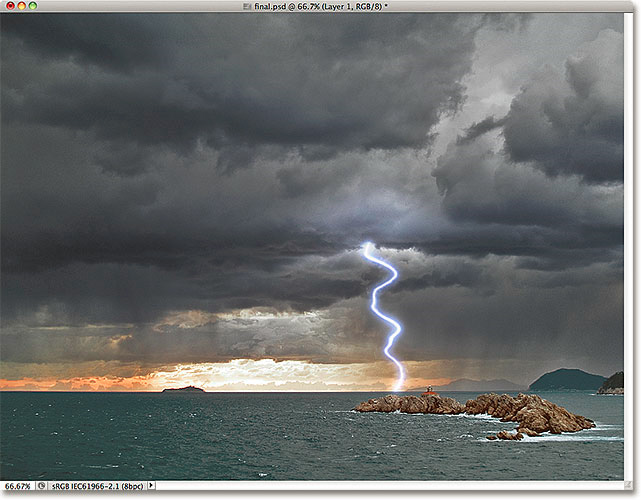
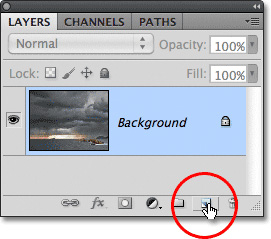
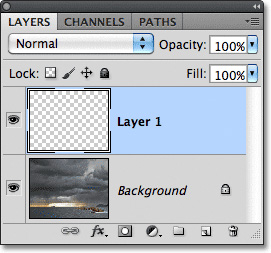
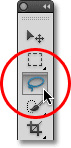
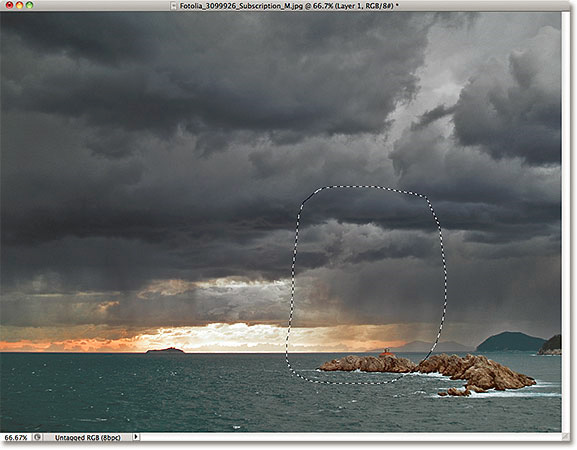
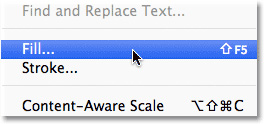
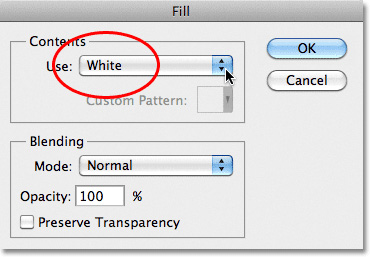
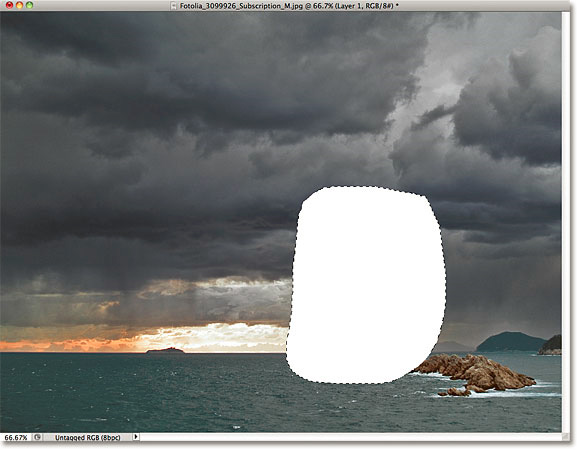
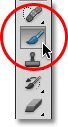
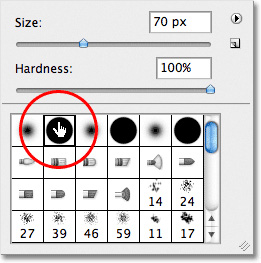
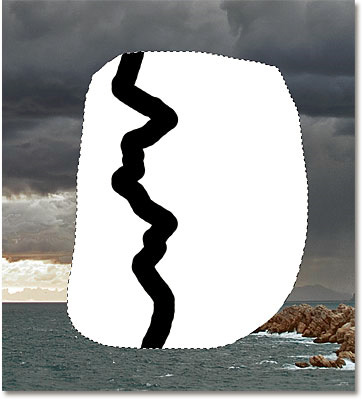
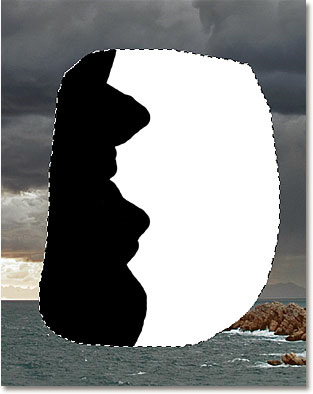
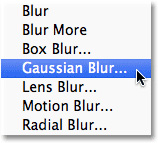
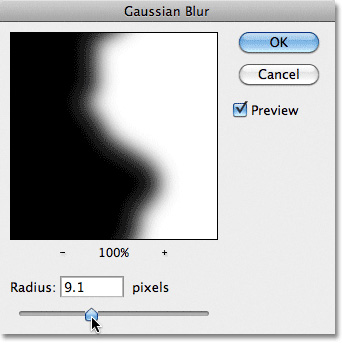
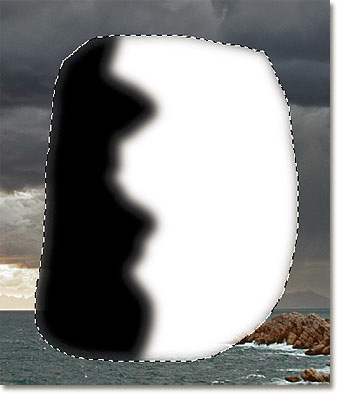
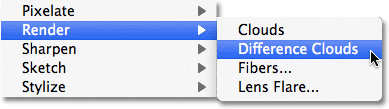
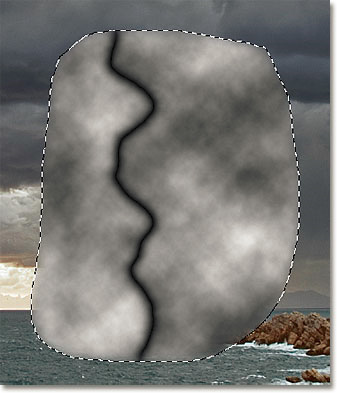
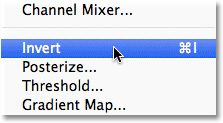
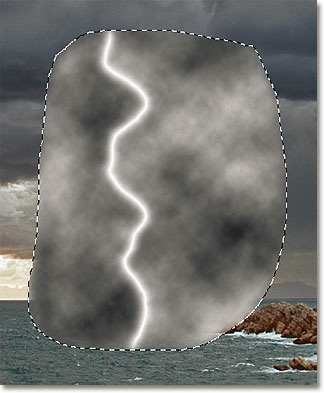
			                      <!--DETAIL-->                      <table cellpadding="0" cellspacing="0" border="0" width="100%">                          <tr>                              <td>  							<div id="VietAd">                                  <p><strong>Quản Trị Mạng - Trong b&agrave;i tiếp theo của series hướng dẫn về c&aacute;c thủ thuật trong Photoshop, ch&uacute;ng t&ocirc;i sẽ tr&igrave;nh b&agrave;y những bước cơ bản để tạo hiệu ứng tia s&eacute;t hoặc sấm chớp.</strong> B&agrave;i viết được sắp xếp theo tr&igrave;nh tự cơ bản, trước ti&ecirc;n l&agrave; tạo những h&igrave;nh ảnh ban đầu, tiếp sau đ&oacute; l&agrave; thay đổi độ s&aacute;ng tối, m&agrave;u sắc v&agrave; th&ecirc;m c&aacute;c hiệu ứng cần thiết. V&agrave; sau khi ho&agrave;n tất b&agrave;i mẫu n&agrave;y, ch&uacute;ng ta sẽ đạt được kết quả như sau:</p>  <p style="text-align: center;"><img width="640" height="499" align="absMiddle" alt="" src="http://www.quantrimang.com.vn/photos/image/042011/22/lightningeffect___02.jpg" /></p>  <p>Trong b&agrave;i thử nghiệm dưới đ&acirc;y, ch&uacute;ng t&ocirc;i tiến h&agrave;nh tr&ecirc;n phi&ecirc;n bản Adobe Photoshop CS5 (đối với c&aacute;c phi&ecirc;n bản trước đ&oacute; th&igrave; c&aacute;ch l&agrave;m cơ bản kh&ocirc;ng c&oacute; g&igrave; kh&aacute;c biệt). Trước ti&ecirc;n, ch&uacute;ng ta cần 1 bức ảnh mẫu với quang cảnh tương tự như tr&ecirc;n. Mở Photoshop, v&agrave; tạo 1 Layer mới từ lớp ảnh nền:</p>  <p style="text-align: center;"><img width="300" height="265" align="absMiddle" alt="" src="http://www.quantrimang.com.vn/photos/image/042011/22/lightningeffect___03.jpg" /></p>  <p style="text-align: center;"><img width="300" height="280" align="absMiddle" alt="" src="http://www.quantrimang.com.vn/photos/image/042011/22/lightningeffect___04.jpg" /></p>  <p style="text-align: center;"><span style="color: rgb(51, 102, 255);">Lớp Layer 1 mới vừa tạo</span></p>  <p>Sau đ&oacute;, chọn c&ocirc;ng cụ <strong>Lasso Tool</strong> từ menu bar (hoặc nhấn ph&iacute;m L):</p>  <p style="text-align: center;"><img width="100" height="208" align="absMiddle" alt="" src="http://www.quantrimang.com.vn/photos/image/042011/22/lightningeffect___05.jpg" /></p>  <p>V&agrave; vẽ 1 v&ugrave;ng chọn trong bức ảnh, đ&acirc;y ch&iacute;nh l&agrave; to&agrave;n bộ phần hiển thị của tia s&eacute;t:</p>  <p style="text-align: center;"><img width="600" height="468" align="absMiddle" alt="" src="http://www.quantrimang.com.vn/photos/image/042011/22/lightningeffect___06.jpg" /></p>  <p>Chọn menu Edit > Fill để đổ m&agrave;u cho v&ugrave;ng chọn n&agrave;y:</p>  <p style="text-align: center;"><img width="300" height="141" align="absMiddle" alt="" src="http://www.quantrimang.com.vn/photos/image/042011/22/lightningeffect___07.jpg" /></p>  <p>Trong mục <strong>Use </strong>tại phần <strong>Contents</strong>, chuyển về lựa chọn <strong>White</strong>:</p>  <p style="text-align: center;"><img width="400" height="278" align="absMiddle" alt="" src="http://www.quantrimang.com.vn/photos/image/042011/22/lightningeffect___08.jpg" /></p>  <p>Nhấn OK, v&agrave; bức ảnh của ch&uacute;ng ta sẽ giống như sau:</p>  <p style="text-align: center;"><img width="600" height="468" align="absMiddle" alt="" src="http://www.quantrimang.com.vn/photos/image/042011/22/lightningeffect___09.jpg" /></p>  <p>Tiếp tục, chọn c&ocirc;ng cụ <strong>Brush Tool </strong>(hoặc nhấn B):</p>  <p style="text-align: center;"><img width="100" height="187" align="absMiddle" alt="" src="http://www.quantrimang.com.vn/photos/image/042011/22/lightningeffect___10.jpg" /></p>  <p>Nhấn ph&iacute;m D tr&ecirc;n b&agrave;n ph&iacute;m để thay đổi chế độ m&agrave;u <strong>Foreground </strong>v&agrave; <strong>Background </strong>về mặc định:</p>  <p style="text-align: center;"><img width="100" height="200" align="absMiddle" alt="" src="http://www.quantrimang.com.vn/photos/image/042011/22/lightningeffect___11.jpg" /></p>  <p>Với c&ocirc;ng cụ <strong>Brush </strong>đang lựa chọn, c&aacute;c bạn nhấn <strong>chuột phải (Windows)</strong> hoặc <strong>Control + click (Mac) </strong>ở b&acirc;t cứ nơi n&agrave;o tr&ecirc;n bức ảnh để mở bảng <strong>Brush Picker</strong>, tại đ&acirc;y ch&uacute;ng ta cần chọn mẫu c&oacute; h&igrave;nh tr&ograve;n, đầy đủ đường viền. Sau đ&oacute; nhấn <strong>Enter (Win)</strong> hoặc <strong>Return (Mac) </strong>để &aacute;p dụng:</p>  <p style="text-align: center;"><img width="300" height="302" align="absMiddle" alt="" src="http://www.quantrimang.com.vn/photos/image/042011/22/lightningeffect___12.jpg" /></p>  <p>Sau đ&oacute;, vẽ 1 đường zigzag bất kỳ dựa theo vị tr&iacute; bạn muốn tia s&eacute;t hiển thị, c&aacute;c bạn c&oacute; thể thay đổi k&iacute;ch thước của <strong>Brush </strong>nhanh ch&oacute;ng bằng ph&iacute;m <strong>[</strong> hoặc <strong>]</strong>. V&iacute; dụ, tại đ&acirc;y ch&uacute;ng ta sẽ vẽ 1 đường như h&igrave;nh dưới:</p>  <p style="text-align: center;"><img width="400" height="442" align="absMiddle" alt="" src="http://www.quantrimang.com.vn/photos/image/042011/22/lightningeffect___13.jpg" /></p>  <p>Sau đ&oacute;, h&atilde;y t&ocirc; m&agrave;u to&agrave;n bộ phần b&ecirc;n tr&aacute;i hoặc phải th&agrave;nh m&agrave;u đen để tiếp tục thực hiện c&aacute;c bước sau:</p>  <p style="text-align: center;"><img width="350" height="441" align="absMiddle" alt="" src="http://www.quantrimang.com.vn/photos/image/042011/22/lightningeffect___14.jpg" /></p>  <p>Việc tiếp theo cần phải l&agrave;m l&agrave; l&agrave;m mờ phần diện t&iacute;ch giữa v&ugrave;ng m&agrave;u đen v&agrave; trắng. Chọn menu <strong>Filter > Blur > Gaussian Blur:</strong></p>  <p style="text-align: center;"><img width="200" height="181" align="absMiddle" alt="" src="http://www.quantrimang.com.vn/photos/image/042011/22/lightningeffect___15.jpg" /></p>  <p>Bảng điều khiển ch&iacute;nh của <strong>Gaussian Blur</strong> hiển thị, h&atilde;y để &yacute; đến hiệu ứng tr&ecirc;n bức ảnh thay đổi thế n&agrave;o khi ch&uacute;ng ta di chuyển thanh trượt <strong>Radius</strong>. Như trong b&agrave;i v&iacute; dụ n&agrave;y, ch&uacute;ng t&ocirc;i chọn gi&aacute; trị Radius bằng 9.1:</p>  <p style="text-align: center;"><img width="400" height="401" align="absMiddle" alt="" src="http://www.quantrimang.com.vn/photos/image/042011/22/lightningeffect___16.jpg" /></p>  <p style="text-align: center;"><span style="color: rgb(51, 102, 255);">Diện t&iacute;ch tiếp x&uacute;c giữa phần m&agrave;u đen v&agrave; trắng khi &aacute;p dụng hiện ứng tr&ecirc;n sẽ trở th&agrave;nh tia chớp</span></p>  <p>Nhấn OK, v&agrave; ch&uacute;ng ta sẽ c&oacute; kết quả như sau:</p>  <p style="text-align: center;"><img width="400" height="466" align="absMiddle" alt="" src="http://www.quantrimang.com.vn/photos/image/042011/22/lightningeffect___17.jpg" /></p>  <p>Chọn tiếp menu <strong>Filter > Render > Difference Clouds:</strong></p>  <p style="text-align: center;"><img width="400" height="112" align="absMiddle" alt="" src="http://www.quantrimang.com.vn/photos/image/042011/22/lightningeffect___18.jpg" /></p>  <p>Kh&aacute;c với một số hiệu ứng kh&aacute;c, kh&ocirc;ng c&oacute; bảng điều khiển m&agrave; Photoshop sẽ tự &aacute;p dụng theo th&ocirc;ng số ngẫu nhi&ecirc;n:</p>  <p style="text-align: center;"><img width="400" height="466" align="absMiddle" alt="" src="http://www.quantrimang.com.vn/photos/image/042011/22/lightningeffect___19.jpg" /></p>  <p>Chọn tiếp menu <strong>Image > Adjustments > Invert:</strong></p>  <p style="text-align: center;"><img width="300" height="165" align="absMiddle" alt="" src="http://www.quantrimang.com.vn/photos/image/042011/22/lightningeffect___20.jpg" /></p>  <p>Qu&aacute; tr&igrave;nh n&agrave;y sẽ l&agrave;m đảo ngược độ s&aacute;ng trong v&ugrave;ng lựa chọn, l&agrave;m cho m&agrave;u s&aacute;ng chuyển th&agrave;nh tối v&agrave; ngược lại:</p>  <p style="text-align: center;"><img width="400" height="485" align="absMiddle" alt="" src="http://www.quantrimang.com.vn/photos/image/042011/22/lightningeffect___21.jpg" /></p>    							</div>                              </td>                          </tr>                      </table>  					
                      <!--END DETAIL-->                  
		</div>
				<div id="author">
						<p>
				<strong>Nguồn tin:</strong>
				Quantrimang.com.vn
			</p>
		</div>
	</div>
	<div id="footer" class="clearfix">
		<div id="url">
			<strong>URL của bản tin này: </strong><a href="http://www.tm-pccc.com/savefile/Thiet-ke-Do-hoa/Tao-hieu-ung-tia-set-185.html" title="Tạo hiệu ứng tia sét">http://www.tm-pccc.com/savefile/Thiet-ke-Do-hoa/Tao-hieu-ung-tia-set-185.html</a>

		</div>
		<div class="clear"></div>
		<div class="copyright">
			&copy; PCCC Thiên Đăng
		</div>
		<div id="contact">
			<a href="mailto:mail@thiendang.net">mail@thiendang.net</a>
		</div>
	</div>
</div>
        <div id="timeoutsess" class="chromeframe">
            Bạn đã không sử dụng Site, <a onclick="timeoutsesscancel();" href="http://tm-pccc.com/#">Bấm vào đây để duy trì trạng thái đăng nhập</a>. Thời gian chờ: <span id="secField"> 60 </span> giây
        </div>
        <div id="openidResult" class="nv-alert" style="display:none"></div>
        <div id="openidBt" data-result="" data-redirect=""></div>
<script src="http://tm-pccc.com/assets/js/jquery/jquery.min.js"></script>
<script>var nv_base_siteurl="/",nv_lang_data="vi",nv_lang_interface="vi",nv_name_variable="nv",nv_fc_variable="op",nv_lang_variable="language",nv_module_name="news",nv_func_name="savefile",nv_is_user=0, nv_my_ofs=7,nv_my_abbr="+07",nv_cookie_prefix="nv4",nv_check_pass_mstime=1738000,nv_area_admin=0,nv_safemode=0,theme_responsive=0,nv_recaptcha_ver=2,nv_recaptcha_sitekey="6LdeIrAZAAAAALw8U3AV10zGDKShsc06XodJx8yA",nv_recaptcha_type="image",XSSsanitize=1;</script>
<script src="http://tm-pccc.com/assets/js/language/vi.js"></script>
<script src="http://tm-pccc.com/assets/js/DOMPurify/purify3.js"></script>
<script src="http://tm-pccc.com/assets/js/global.js"></script>
<script src="http://tm-pccc.com/assets/js/site.js"></script>
<script src="http://tm-pccc.com/themes/default/js/news.js"></script>
<script src="http://tm-pccc.com/themes/default/js/main.js"></script>
<script src="http://tm-pccc.com/themes/default/js/custom.js"></script>
<script type="application/ld+json">
        {
            "@context": "https://schema.org",
            "@type": "Organization",
            "url": "http://tm-pccc.com",
            "logo": "http://tm-pccc.com/uploads/logo-thiendang-vi-300x58.png"
        }
        </script>
<script async src="https://www.googletagmanager.com/gtag/js?id=G-XMJCK8JENQ"></script>
<script>window.dataLayer=window.dataLayer||[];function gtag(){dataLayer.push(arguments)}gtag('js',new Date);gtag('config','G-XMJCK8JENQ');</script>
<script type="text/javascript">  						$(document).ready(function() {  							$(&#039;.slideTable  a,.SlideTable  a&#039;).lightBox({fixedNavigation:true}).removeAttr("onclick").attr( "title", "Ảnh lớn" );  						});  					</script>
<script src="http://tm-pccc.com/themes/default/js/bootstrap.min.js"></script>
</body>
</html>